

Pick any small business on your local high street and look up its Facebook or Instagram page.
There’s a good chance the last post was weeks ago. Sometimes months. The owner knows social media matters, but between serving customers, managing staff and doing the books, it’s the first thing to slip.
That gap is a business opportunity. Plenty of owners would rather pay someone a monthly fee to keep their pages active, professional and answered than learn to do it themselves. And unlike one-off projects, that fee comes in every month.
This guide covers how to start a social media management business from scratch: choosing who to serve, getting your first clients, pricing, onboarding, reporting and the tools that make it manageable for one person.
Step 1: Choose Who You Serve
“I do social media for businesses” is hard to remember and hard to market. “I help independent cafés in Bristol fill quiet afternoons” is easy to both.
Narrow your focus in one or both of two ways:
- By niche: restaurants and cafés, hair and beauty salons, trades, gyms, estate agents, dentists, florists, pet services.
- By location: your town or region. Local owners talk to each other, and “I’m local” is a strong opening.
You can broaden later. A narrow focus makes your first content, your outreach and your pricing far easier.
Step 2: Get Your Own House in Order
Sooner or later every prospect asks to see your social media. If it hasn’t been updated since spring, the conversation’s over.
Before you approach anyone, run your own brand as if it were your best client: a complete profile, a clear one-line bio, consistent posting for a few weeks, and a couple of examples of what you’d do for a business like theirs. Add a simple freebie with email capture on your bio page so interested owners can join your list.
Your own feed becomes your portfolio, your case study and, over time, a source of inbound enquiries.
Step 3: Find Clients With a Free Audit
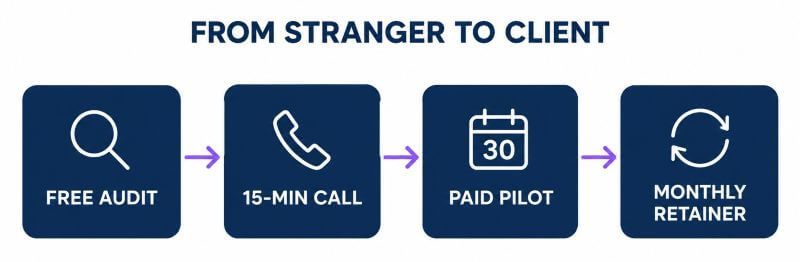
“Would you like to hire me?” is a hard question for a stranger to say yes to. “Would you like a free audit of your social media?” is an easy one.

A good audit is short and specific:
- A simple score across ten areas: profile completeness, branding, posting frequency, content mix, visuals, engagement, calls to action, link in bio, platform coverage and how they compare with competitors.
- Two genuine positives.
- The three biggest gaps, with specifics (“last Instagram post was seven weeks ago”).
- A comparison with two competitors.
- Three quick wins they can do themselves.
- One example post showing what their feed could look like.
Offer it by personalised email, DM, LinkedIn message or a quick visit at a quiet time of day. When someone says yes, walk them through it on a 15-minute call, then offer a paid 30-day pilot rather than jumping straight to a long contract.
If you email businesses cold, follow the rules where you are. In the UK that means the PECR rules on electronic marketing (generally more permissive for limited companies than for sole traders). In the US, the CAN-SPAM Act. Always identify yourself and offer a simple opt-out.
Step 4: Price for the Result, Not the Hours
Most beginners undercharge, take on too many clients and burn out. Start by working out your floor price: the income you want plus your costs, divided by the number of clients you can realistically handle.
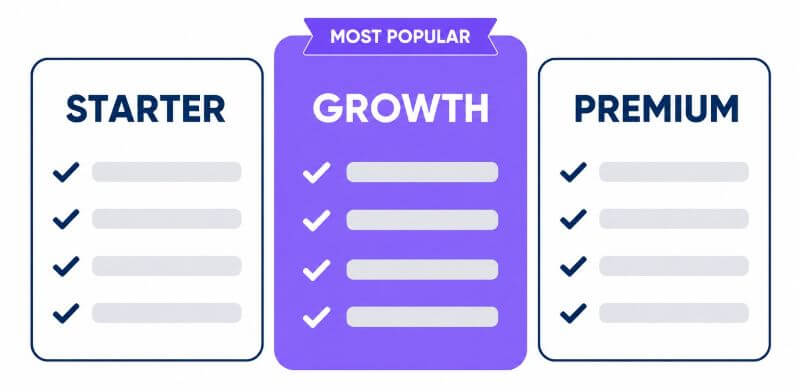
Then offer three packages. Most clients choose the middle one.

| Starter | Growth | Premium | |
|---|---|---|---|
| Platforms | 2 | 3–4 | Up to 6 |
| Posts per month | 12 | 20 | 30 |
| Comments and DMs | – | Weekdays | Daily |
| Short videos | – | 2 | 4 |
| Monthly report | Summary | Full | Full + review call |
Research what local providers charge, then set your own prices. A setup fee for the first month, a three-month minimum term and payment in advance protect you. Be clear about what isn’t included, such as ad spend, photography and website work, and price those as add-ons.
Step 5: Onboard Clients Properly
The first few weeks set the tone for the whole relationship. Within 24 hours of a yes, send a welcome email explaining what happens next, a short brand questionnaire (what they do, who their best customers are, how they want to sound, what to avoid) and a request for their logo, colours and photos.
Never ask for passwords by email. Connect accounts through each platform’s official permission process, ideally on a short screen-share with the client, and agree how access will be handed back if you ever part ways.
Agree an approval process up front: batches of posts, a turnaround time and one round of changes. In week three, send a short “early wins” email. It reassures the client long before the first report.
Step 6: Report So Clients Stay
Clients rarely leave because the posts were bad. They leave because they can’t see what they’re getting.
A two-page monthly report fixes that: a one-line headline, what you did, four or five key numbers compared with last month, the top three posts and why they worked, what you learned, how they compare with competitors, and next month’s plan. Explain the numbers rather than just listing them.
Every quarter, step back with the client, review results, plan around their seasonal peaks, and suggest an upgrade if it would genuinely help.
Step 7: Use a Calendar to Make Content Timely
Generic content feels generic. What makes a plan feel tailored is timing: Mother’s Day for the florist, January for the gym, autumn boiler checks for the plumber, Christmas parties for the restaurant. Keep a calendar of key dates and each client’s seasonal peaks, and plan gift-giving campaigns two to four weeks ahead.
The Tools Problem
Doing all of this properly for several clients usually means a scheduler, a design tool, an AI writer, a feed reader, a link-in-bio tool, an inbox and something for reports. Several subscriptions, several logins, and a lot of copying and pasting between them.
Viral Dashboard: What It Does
Viral Dashboard, from Firas Alameh and Rahul, puts that whole workflow behind one login:
- an AI content strategist that plans 30 days of content for any business and drops it into the calendar as editable drafts
- AI captions and a built-in Creative Studio with templates and brand kits
- one composer that publishes to 20 platforms, including Facebook, Instagram, TikTok, LinkedIn, YouTube, Pinterest and Google Business
- a unified inbox for comments and DMs across every account
- cross-platform analytics, competitor tracking, social listening and PDF reports
- bio pages with email capture
- five separate brand workspaces, team seats and approval workflows
- a commercial licence to run it for paying clients
It launches on Monday 19 October 2026 as a $147 “All Access” bundle, which includes the professional tier of all its upgrades rather than a stripped-down front end.
My Verdict
Ignore the sales material about agencies making six figures a month. You don’t need that, and most people won’t get it.
What’s genuinely useful is the combination: planning, writing, design, publishing, inbox and reporting in one place, with separate workspaces for each client and approvals built in. That’s exactly the workflow this guide describes, and it’s what lets one person look after several small businesses without drowning in tabs. With a handful of local clients on sensible monthly fees, that’s a very real second income.
The software won’t find clients or set your prices for you, and you’ll still need to review what the AI writes. But as the engine of a small agency, it covers a lot of ground for a one-off price.
My Bonuses If You Pick It Up
If you buy Viral Dashboard through my link, I’ll send you five reports that turn the commercial licence into a working client business:
- The Free Social Audit Offer: a scorecard, outreach scripts and the call that turns an audit into a paid pilot
- Agency Pricing & Packages: floor price, three tiers, a proposal outline and contract essentials
- Client Onboarding & Monthly Report Kit: welcome checklist, brand questionnaire and a two-page report template
- The 2027 Content Calendar for Local Businesses: UK and US key dates, plus seasonal hooks for 12 niches
- Run It For Yourself First: using your own brand to build proof, an email list and inbound leads
See Viral Dashboard and my five bonuses here →
Frequently Asked Questions
Do I need experience to start a social media management business?
Not formal experience, but you do need to show you can do it. Running your own brand well for a few weeks, and offering free audits, is the quickest way to build that proof.
How many clients do I need?
It depends on your prices and goals. Work out your floor price first. Many people find a handful of local clients on monthly retainers is enough for a meaningful second income.
What should I charge for social media management?
Rates vary widely by location, niche and scope. Research local providers, work out your own floor price, and offer three clear packages rather than charging by the hour.
Which platforms should I offer?
The ones your clients’ customers actually use. For most local businesses that means Facebook, Instagram and Google Business, with LinkedIn for professional services and TikTok for younger audiences.
Disclosure: this post contains affiliate links. If you buy through one of them I earn a commission at no extra cost to you.
